Sky Map
- 4.1
- Rating
- 50.00M
- Installs
- Free
- Price

 Analysis by App-foxy
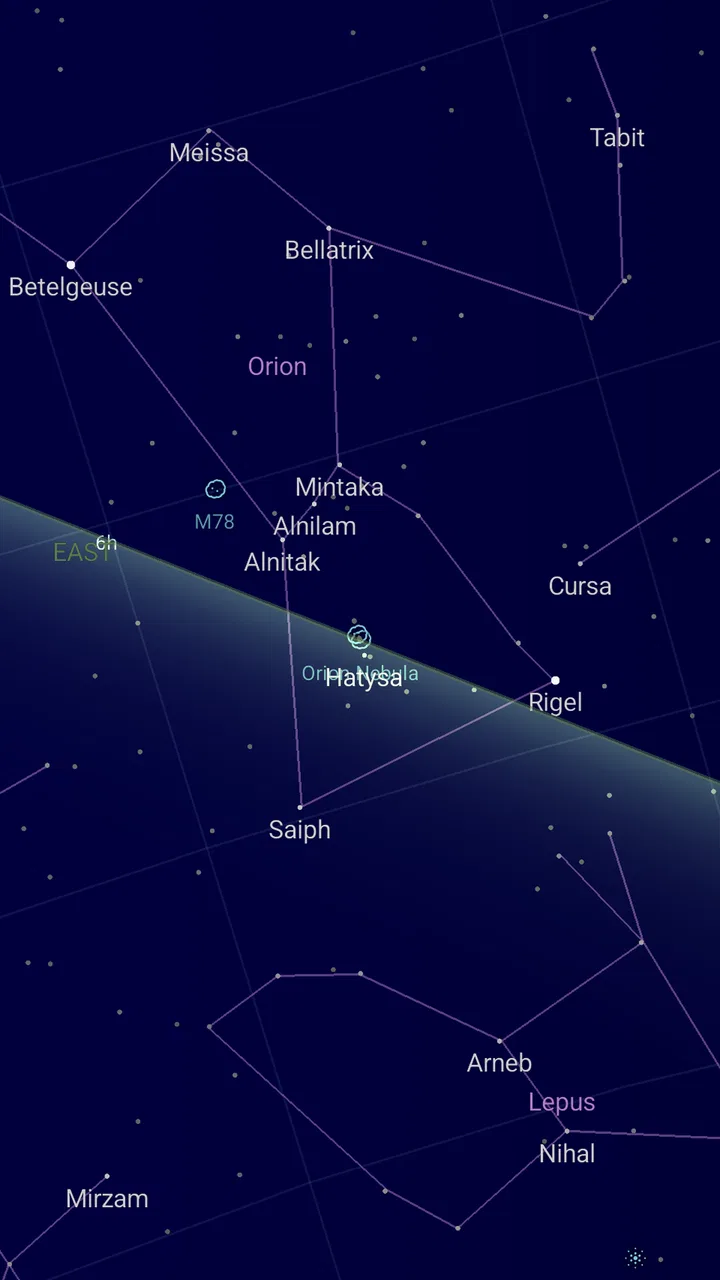
I like astronomy apps that get out of the way quickly. When I want to identify a bright point above the roofline, I do not want to build an observing plan first or work through a complicated catalog. I want to point my phone upward and get a useful answer. Sky Map is built around that simple habit, and in my experience it works best as a quick visual reference rather than as a complete replacement for an astronomer’s toolkit.
Developed by Sky Map Devs, this free Books & Reference app turns a phone into a practical guide to the night sky. It is suitable for Everyone, which matches the straightforward way it presents its subject. The app has reached over 50 million installs, with an average rating of 4.1 from around 486 thousand ratings and roughly 36 thousand reviews. Those figures suggest a well-established tool, but they do not remove the need to learn how to use it properly. A little patience with positioning and settings makes a noticeable difference.
My baseline workflow for identifying the sky
My usual first step is to open Sky Map before I start looking around with the naked eye. I hold the phone in front of me, point it toward the part of the sky I want to understand, and compare the labels on screen with the brightest objects I can actually see. The basic pleasure of the app is that it converts an unfamiliar view into something readable without asking me to already know the names.
You May Also Like

 AccuWeather: Weather Radar
AccuWeather Review: A Quick, Clear Forecast for Everyday Decisions
For everyday plans, the best forecast is the one you can understand quickly. AccuWeather makes rain timing, radar, and local conditions easy to act on, with a few trade-offs.

 Hill Climb Racing
Why Hill Climb Racing Still Turns Crashes Into One More Run
A tiny car, a bumpy hill and one more upgrade: Hill Climb Racing keeps resurfacing because its simple chaos makes every near-miss feel personal.

 AliExpress - Shopping App
AliExpress Makes Global Shopping Feel Personal, but Shoppers Bear the Risk
AliExpress turns a global marketplace into a pocket-sized discovery engine. Its reach is useful, its shopping loop compelling, and its trade-offs easy to miss.

 Lords Mobile: Kingdom Wars
Lords Mobile Is a Kingdom-Building Routine, Not a Quick Match
A case-by-case verdict on the building, battles, device demands, and social commitments that make Lords Mobile rewarding for some players and exhausting for others.

 PDF Scanner app - TapScanner
TapScanner Makes Paperwork Easier to Capture, Check, and Share
TapScanner makes scanning with a phone feel less like a rescue operation and more like a dependable step in getting work done. Its capture tools are useful, though not flawless.

 Block Blast!
Block Blast! Shows How Much a Puzzle Game Can Leave Out
A quiet grid game shows why puzzle players increasingly value instant clarity, repeatable skill and low-pressure play—and where the genre still needs to catch up.
More From Our News Desk
View All News


This is particularly useful on an ordinary evening when I notice one bright object and wonder whether it is a star or a planet. Instead of searching through a general web browser, I can use the live sky view as a visual check. I still treat the result as guidance, not as an unquestionable measurement. If the phone is tilted, held at an awkward angle, or pointed through a window, the labels may not line up perfectly with what I see.
A realistic everyday example is a short break outside after dinner. I might spot a recognizable pattern, open the app, and slowly move the phone until the displayed outline matches the stars overhead. That slower movement is important. Swinging the phone quickly across the sky can make the display feel confusing, while small adjustments let me connect the screen with the real view.
I also find it useful to begin with a broad question rather than trying to identify everything at once. Looking for a constellation, a bright object, or the general direction of a familiar part of the sky gives me a clear purpose. Scanning randomly is less satisfying because the screen can present more names than I can absorb in one glance.
Sky Map is not only for people who already know astronomy. Beginners can use it as a visual vocabulary builder: look at one pattern, read its label, then return to the sky and find the same shape. Over several sessions, this creates recognition that a static chart does not always provide. The phone becomes a bridge between reading and observing.
Why the live view feels more useful than a printed chart
A printed star chart is excellent for planning, learning orientation, and avoiding screen glare. It also encourages me to look at the sky for longer instead of constantly checking a device. However, a paper chart requires me to understand how it is oriented before I can use it confidently. Sky Map reduces that initial barrier by placing labels over the direction I am already viewing.
Compared with a normal search engine, the app is better for the first moment of curiosity. A web search can tell me what might be visible, but it does not give the same immediate relationship between my phone’s view and the sky above me. On the other hand, a search engine or an astronomy reference book can offer deeper explanations once I have found an object. I see Sky Map as the quick identification layer, not the whole learning experience.
Its free price also makes it easy to try without turning a casual interest into a purchase decision. That matters for families, students, and anyone who only occasionally looks upward. The Everyone age rating makes it a comfortable choice for shared use, although younger children will still benefit from an adult explaining that the labels are aids to observation rather than a substitute for actually looking at the sky.
Settings I check before relying on the display
The first setting-related habit I recommend is checking whether the display is behaving in the way I expect before going outside. If the view seems rotated or the labels do not follow my movement, I do not immediately assume the sky is wrong. I hold the phone steadily, move it gradually, and give the orientation time to settle. This simple pause often solves what feels like a larger problem.
I also pay attention to the difference between an uncluttered view and a highly labeled view. More information can be useful when I am studying a region, but too many names can hide the simple shape I am trying to recognize. For a beginner, reducing visual distraction is usually more helpful than displaying every possible reference at once.
My preferred approach is to start with a clean view, identify the largest pattern, and then add detail only when I have a specific question. For example, I might first locate a constellation and only afterward look for a particular star within it. This two-stage workflow prevents the app from becoming a moving wall of text.
Screen brightness is another small but important consideration. A bright phone can make the surrounding sky harder to see, especially away from city lights. I lower the brightness before beginning a longer session and use the app briefly, then look away from the screen. That habit keeps the phone useful without allowing it to dominate the observation.
Location and time also matter to the usefulness of any sky guide. I prefer to open the app where I am actually observing rather than relying on a remembered view from another place. If I move during the evening, I mentally reset my expectations instead of assuming the same arrangement will remain unchanged. This is not a flaw unique to Sky Map; it is a basic part of matching a digital sky view to the real one.
Faster patterns that make short sessions worthwhile
Experienced use is less about tapping constantly and more about repeating a dependable sequence. I open the app, choose one target, orient the phone slowly, compare the label with the visible pattern, and then put the phone down. That sequence takes less effort than wandering through the display and gives me a clear result even when I have only a few minutes.
Another useful pattern is to use a bright object as an anchor. I find the easiest point in the sky first, then move outward toward less obvious stars or neighboring shapes. This works better than beginning with a faint area where I have no visual reference. The app is most helpful when I combine its labels with something my eyes can already detect.
I also recommend learning one small region at a time. Rather than trying to memorize the entire screen, I choose a constellation or nearby group and revisit it on different evenings. The changing position helps me understand that the sky is not a fixed poster. Sky Map then becomes a repeatable practice tool instead of a one-time novelty.
For a family or group, I would hand the phone to one person at a time and give each person a simple task: find the label, match the brightest point, or describe the shape. That avoids everyone staring at the same screen while one person controls it. The app works especially well as a conversation starter because it gives non-experts something concrete to point at.
When I am outside with friends, I avoid narrating every label the app shows. I choose one interesting identification and use it to lead the discussion. This keeps the experience social and prevents the technology from replacing the sky itself. The strongest use of Sky Map is often a short confirmation followed by several minutes of unaided observation.
Where the app reaches its limits
The live phone view is convenient, but it depends on the phone being held and oriented sensibly. If I move too quickly, stand near visual distractions, or try to use it through glass, the relationship between display and sky becomes less convincing. I can usually improve the experience by slowing down and checking a broader area, but the app cannot remove the physical limitations of the device.
Urban light pollution is another important limitation. Sky Map may help me understand where an object should be, yet a bright city sky can prevent me from seeing the fainter stars that form the surrounding pattern. In that situation, the app can still teach direction and layout, but it cannot make invisible stars appear to my eyes.
I would not choose it as my only tool for serious observing sessions. Someone planning detailed observations, studying technical astronomical information, or needing a more specialized reference may prefer a dedicated astronomy application, a proper star atlas, or an observing guide. Those alternatives can be better when depth, planning, and precision matter more than immediate simplicity.
There is also a learning trade-off. Because the app identifies objects so quickly, I can become dependent on labels if I never pause to study the shapes myself. I get more from it when I use the screen briefly, memorize one relationship, and then test myself without the phone. The app supports learning, but it does not automatically create it.
People who dislike holding a phone outdoors, want a completely screen-free activity, or prefer long written explanations may be happier with a printed chart or a book. Sky Map is designed around visual interaction, so its strengths are tied to the same screen-based approach that some observers may find distracting.
Who I think will enjoy Sky Map most
I would recommend it first to beginners who often look at the sky and ask, “What is that?” It is also a good fit for families, casual learners, travelers who want a lightweight reference, and students who need a friendly way to connect names with visible patterns. The fact that it is free removes much of the risk for someone who is simply curious.
It is less suitable for an observer who already has a carefully developed workflow and needs extensive planning or technical detail. In that case, a specialized alternative may provide more control. I would also skip it as a primary choice if my goal were to spend an entire evening without a phone. A paper chart would better support that kind of session.
The developer, Sky Map Devs, has clearly kept the central idea focused: use the phone as a window onto the night sky, then let the user decide how deeply to explore. That focus is a strength. I do not have to learn a complicated system before getting value from the app, but I also should not expect it to replace every other astronomy resource.
My final recommendation after using it as a regular reference
Sky Map is at its best when I use it as a quick bridge between curiosity and observation. It helps me identify what I am seeing, gives beginners a clear starting point, and supports repeatable habits that gradually make the sky feel less unfamiliar. Its free access and Everyone rating make it easy to share, while its large install base and 4.1 average show that it has become a familiar choice for many people.
The practical advice is simple: begin with one target, orient the phone slowly, keep the display readable without making it overpowering, and look away from the screen often. Use the app to confirm a pattern rather than to label every point of light. That approach reveals its real value and reduces its main weaknesses.
I would recommend Sky Map to anyone who wants an approachable first step into stargazing, especially when the goal is quick identification during an ordinary evening. I would choose a more advanced astronomy tool or a printed chart for detailed planning and screen-free observation. For casual discovery, however, it remains a useful companion: open it, find one thing, learn its place, and then let your eyes take over.
FAQs for Sky Map
01What is Sky Map and how does it work?
Sky Map is a planetarium app that uses your device's sensors and GPS to provide a map of the night sky. By pointing your device at the sky, you can identify stars, planets, and constellations in real-time. It overlays celestial information on your screen, making stargazing more interactive and educational.
02Is Sky Map free to download and use?
Yes, Sky Map is completely free to download and use on both Android and iOS devices. There are no hidden fees or in-app purchases, which makes it accessible to anyone interested in astronomy. Its open-source nature allows for community-driven updates and improvements.
03Does Sky Map require an internet connection to function?
Sky Map does not require an internet connection to function once it is installed. It uses your device’s GPS and internal sensors to provide accurate sky mapping. However, an initial internet connection might be needed to download the app and any updates that may improve its features or fix bugs.
04Can Sky Map be used in daylight or indoors?
Sky Map is designed primarily for use outdoors at night. However, it can function indoors and during the day by simulating the current sky conditions. This allows users to explore and learn about celestial objects that are not visible due to daylight or indoor settings.
05What features make Sky Map stand out compared to other stargazing apps?
Sky Map offers an intuitive and user-friendly interface that makes it accessible for beginners. It provides real-time sky mapping, a time-travel feature to explore past and future skies, and detailed information on celestial objects. Its open-source nature ensures regular updates and community input, enhancing its reliability and accuracy.
Pros
- Accurate star mapping for easy identification.
- User-friendly interface for all ages.
- Works offline
- no data needed.
- Customizable settings enhance experience.
- Educational tool for astronomy enthusiasts.
Cons
- Limited features compared to premium apps.
- Occasional GPS inaccuracies.
- Interface feels outdated.
- Ads can be intrusive at times.
- No night mode for eye comfort.

Sky Map
Gallery